
Smart Switch Installation in Dubai: Wi-Fi, Zigbee and Touch Switches, No-Neutral Wiring, 3 Way Switches, Shelly and Sonoff Modules, Smart Plugs and Automation
A smart switch is a wall switch with a small computer inside. It still turns the light on and off by hand, and it also answers to a phone, a schedule, a sensor or a voice command. The electrical part of the job is the same as for any switch: isolate, wire, test. The part that catches people out is everything around the wire: whether the switch box has a neutral, whether the switch is made for 230 V, whether it fits the plate, whether the Wi-Fi reaches it, and whether the two or three switches on the same light can all stay in use.
Circuit Dubai installs and replaces smart switches in villas, apartments, offices, shops, hotels and restaurants across Dubai. That covers Wi-Fi and Zigbee wall switches, touch glass switches, two-way and three-way smart switch wiring, no-neutral smart switches, relay modules that sit behind an existing switch, smart plugs and smart sockets, fan controllers, gate-opener controllers, wall control panels and the automation that ties them together. People find this page by searching smart switch installation, smart switch no neutral, wifi switch wiring, smart switch 3 way wiring, shelly 1 wiring, sonoff smart switch installation and moes smart switch installation. The terms section answers each, and the brand section says what we can and cannot promise for each make.
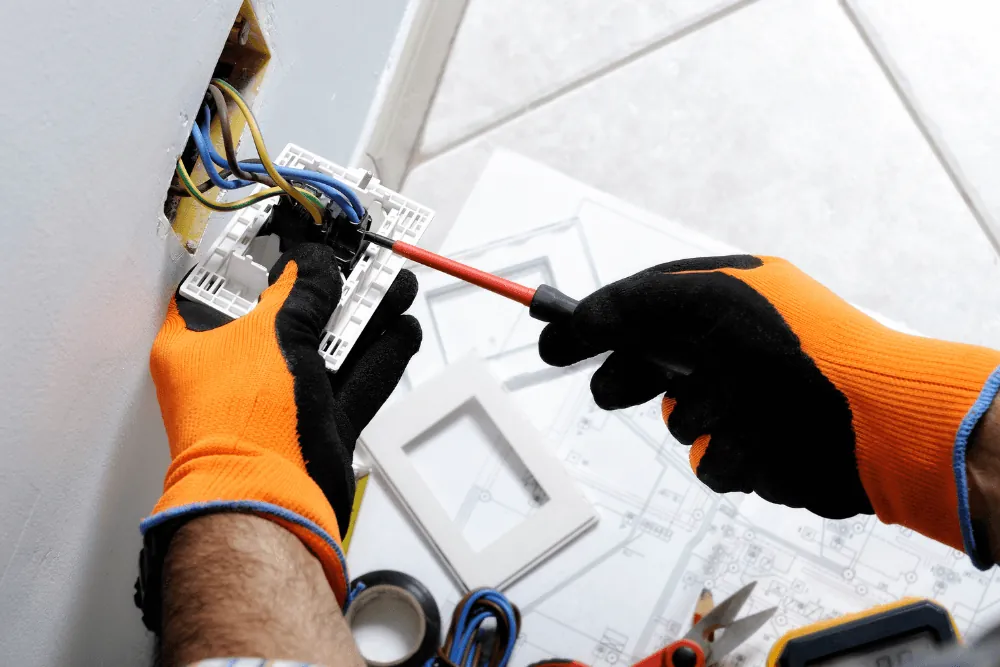
What a smart switch job with us includes
The box checked first. With the breaker off, we open each switch box and note the neutral, the number of wires, the box depth and whether it is a one-way or two-way circuit, before anything is ordered.
The right type for each position. A smart switch with a neutral where there is one, a no-neutral switch or a module where there is not, and a touch panel where a plate is wanted.
A 230 V rating checked. Smart switches sold online can be for 120 V, and a wrong one is a hazard. We read the label and the data sheet.
The two-way and three-way circuits kept working. Every switch that controlled the light before still controls it after.
Set-up in your own account. We pair each device to your app and your voice assistant, in your own account, and we keep no passwords.
A test of the physical and the smart side. The wall switch, the app and the schedule are each run, and so is what happens when the Wi-Fi is off.
Any make you choose. We supply the switch, or fit the one you bought. We work with any major brand, and we do not claim to be a dealer for any of them.
The numbers at a glance
Typical answer for Dubai
Before you book, switch off the breaker for the light and open one plate. Look for a blue wire at the back of the box. That wire is the neutral, and it decides which smart switches you can use. Photograph the box without moving any wire, and write down how many switches control the same light: one, or two or more. If you have already bought switches, send a photo of the label on the back or the box, so we can read the voltage range and the type.
Smart switch terms explained: types, protocols and platforms
The names in this field are inconsistent, and the same product has three or four of them. This section sorts the words you will meet.
Wall switch, touch switch, module and plug
| If you searched | What it means |
|---|---|
| smart switch installation, instal smart switch, smart home switch installation, wifi smart switch installation, wifi switch installation, replace switch with smart switch, smart switch replacement | Taking an ordinary wall switch out and fitting a smart one in the same box, in the same plate size where it fits |
| retrofit smart switch, smart switch retrofit | Adding smart control to a house that was not built for it, without opening the walls. A smart switch in the existing box and a module behind the existing switch are both retrofits |
| smart switch wiring, wiring a smart switch, wiring smart switches, wifi switch wiring | The connection of a smart switch to the supply, the lamp and, where it has one, the neutral. The wiring sections set it out |
| touch switch installation, touch switch wiring, wifi touch switch installation, smart touch switch install | A glass panel with touch pads in place of rockers. It is wired like a smart switch, needs a neutral in most models, and comes in one to four gangs |
| smart plug install, smart plug installation, smart socket installation | A plug-in adaptor, or a wall socket with smart control built in. A plug-in one is plugged in. A wall one is wired like any socket |
Protocols: Wi-Fi, Zigbee, Z-Wave and Bluetooth
| Protocol | How it connects | What to know |
|---|---|---|
| Wi-Fi | Straight to your router | No hub needed. Most Wi-Fi smart switches use the 2.4 GHz band only. Each device adds load to the router, and a weak signal at the switch box gives dropouts |
| Zigbee | Through a hub or gateway, in a mesh | Low power, quick, and each mains-powered device helps pass the signal along. It needs a hub of a compatible family |
| Z-Wave | Through a hub, in a mesh | Similar to Zigbee but on a radio frequency that is set by region. The device and the hub must be of the same region |
| Bluetooth mesh and radio remote | A phone or a remote, nearby | A short range. Suited to small rooms and wireless add-on buttons |
Zigbee home automation, zigbee based home automation system, zigbee home automation devices and zigbee home automation hub are searches about the second row, and the automation section explains how a hub is chosen.
Platforms and apps
A platform is the company and the app behind the devices. Tuya, which sits behind the Smart Life app and several brands, Sonoff with its eWeLink app, Shelly with its own app, TP-Link's Kasa, Meross, Aqara and others each run their own cloud and app. The platform decides which voice assistants and which hubs the device works with. A device that is on a platform your home already uses is simpler to add than one that starts a new app.
Choosing smart switches: neutral, rating, plate and make
The five checks
The neutral. Does the switch box have a blue neutral wire? The answer sets the type of switch.
The voltage. The label must show 230 V or a range that includes it, such as 100 to 240 V.
The load. The switch's rating, in amps or watts, must cover the lamps. A low-power LED load needs a switch whose minimum load it meets.
The plate. The plate must fit the box. A plate made for American boxes or for another European size may not fit a Dubai box. We check before you order.
The platform. The app, the hub and the voice assistant you use or want.
Marks, makes and what we will not fit
A smart switch is a mains device with a radio inside, and an unbranded one with no rating is a risk. We look for a named maker, a stated voltage and current rating on the switch, and the maker's safety markings. A CE smart switch installation, for instance, is the fitting of a switch that carries the CE mark, which is a manufacturer's declaration for the European market. The mark is a starting point, not a guarantee, and we do not fit a switch that has no rating, no maker's name or terminals that look unsafe, even if you have already bought it.
Planning a smart switch job: what to check and what to tell us
Before the visit
The breaker. Find the breaker for each light and switch it off. If the light is on a circuit shared with sockets, tell us.
The box. Open the plate with the power off and photograph the wires without moving them. Do not touch the wires.
The wiring pattern. How many switches control each light. A light switched from two places needs two-way handling.
The Wi-Fi. Check that your phone has a signal at each switch position. A signal of two bars or less at the box is a warning.
The platform. If you already have an app or a hub, tell us which.
What to tell us
- The number of switches, and the rooms.
- The brand and model if you have bought them, or the platform you want.
- Whether you want touch panels, rockers or buttons, and whether the plate must match your existing sockets.
- Whether you want automation, such as lights that come on at sunset or a good-night button that switches everything off.
- Any problems now: a flicker, a light that glows when off, a switch that is warm.
Rules and safety for smart switches
We isolate the breaker, prove the circuit dead with a tester that has been proved on a live source, and test again on the terminals. A smart switch is bulkier than a plain one and has electronics that warm up, so we leave space in the box and do not stack several in a shallow box without checking the maker's derating. Smart switches are kept out of wet zones in bathrooms and are not fitted outdoors unless they are in a weatherproof enclosure. We do not use a smart switch to switch a heavy load directly. A water heater, a cooker or an air conditioner is switched through a contactor, a smart relay rated for it or its own isolator, and the switch installation and replacement page covers those loads.
Smart switches with no neutral: why they exist, how they work and when to avoid them
Most smart switch searches are about the neutral. It is the biggest practical difference between a smart switch and an ordinary one, and it is the reason a switch that worked in the shop does not work in the wall.
Why the switch box may have no neutral
A smart switch has electronics inside that must be powered all the time, even when the light is off, so that it can hear the app. To be powered, it needs a live and a neutral. An ordinary switch needs only a live in and a switched live out. In a loop-in lighting system, the cable at the ceiling carries the live down to the switch and the switched live back up, and the neutral goes straight to the light and never visits the switch. The switch box then has two live cores and no neutral. Some lighting circuits, and most circuits in a newer building that was wired with smart control in mind, bring a neutral to the box.
Three ways to deal with it
| Option | How it works | When we use it |
|---|---|---|
| Bring a neutral to the box | A cable is run from the light or the board to the switch box, and the smart switch is wired in the ordinary way | When the route is open, such as a ceiling void, a surface conduit or a house being rewired. It is the most reliable answer |
| A no-neutral smart switch | The switch powers itself through the lamp, by letting a tiny current pass when the light is off | When a neutral cannot be brought and the lamps are a load the switch is made for |
| A module at the light or in the ceiling | A smart relay sits in the ceiling rose or the void where the neutral is, and the wall switch keeps working as a plain control | When the wall plate must stay as it is, or when no-neutral switches have failed with the lamps |
How a no-neutral smart switch behaves
A two-wire smart switch has to take its supply from the lamp circuit, so a small current always flows through the lamp, even when the switch is off. With a filament lamp, that current is too small to light it. With an LED lamp it can be enough to make the lamp glow faintly, flash now and then, or flicker when it is dimmed. For this reason, no-neutral switches state a minimum load, and some include a bypass: a small unit that goes across the lamp and carries the standby current so that the lamp stays dark.
Searches for smart switch no neutral, smart switch install no neutral, smart home switch no neutral, smart life switch no neutral, tuya smart switch no neutral, moes no neutral switch, moes smart switch no neutral, moes smart switch no neutral installation, alexa smart switch no neutral, smart wifi switch without neutral, wifi wall switch no neutral, smart switches that don t require neutral, no neutral z wave switch and z wave no neutral switch all describe these devices. Best no neutral smart switch is a question we answer by criteria and not a ranking, because no one switch is best for every lamp. The criteria are:
- The lamp load against the switch's minimum. A single 3 W LED on a switch with a 10 W minimum will flicker. A group of lamps that add up above the minimum is fine.
- A bypass in the box. If the switch includes one, we fit it across the lamp, or in the ceiling rose, where the instructions say.
- The lamp type. A dimmable LED of good quality tolerates the standby current. A cheap non-dimmable LED may not.
- The platform. The switch must be on the platform you use, and its radio must reach the hub or the router.
- The voltage and the plate. 230 V and a plate that fits the box.
Z-Wave and Zigbee no-neutral switches exist, and they need a hub of the same family. A Wi-Fi no-neutral switch does not need a hub, and it relies on the router. We test each one with the lamps that are installed before we fit the rest of the house, and where the lamp glows or flickers, we change to a bypass, a neutral or a module.
When we advise against a no-neutral switch
A no-neutral smart switch is the wrong choice for a single small LED, for a circuit with a motion sensor or a doorbell transformer on it, and for a fan or a motor load. In those cases we bring a neutral or use a module. A no-neutral switch also adds a small steady load through the lamp, which is negligible in watts and a nuisance in glow, so a bedroom light that glows at night is a good reason to choose the neutral.
Smart switch wiring: one-way, multi-gang and touch switches
Wiring a smart switch with a neutral
A smart switch with a neutral is wired from four conductors and the earth. The maker's diagram gives the terminal names, which vary, and we follow it and not the cable colours.
| Terminal | What goes to it |
|---|---|
| Line or L in | The live supply |
| Neutral or N | The neutral, brought to the box |
| Load or L out | The switched live to the lamp |
| Earth | The earth of the cable, to the switch if it has a terminal |
Wiring a smart switch, wiring smart switches and smart switch wiring all start from this table. Where a two-core cable drops from the ceiling to the switch, the second core carries the switched live, and we sleeve it brown at both ends so that a later electrician does not take it for a neutral.
Multi-gang and touch switches
A two, three or four-gang smart switch has one supply and a load output for each gang. A touch switch is the same electronics in a glass panel. Touch switch installation, touch switch wiring, wifi touch switch installation and smart touch switch install follow the same wiring as a rocker smart switch. The glass panel is more sensitive to damp hands, to a loose fixing and to a bad earth, so we fix it square and test every pad. A touch switch needs a neutral in most models, so the box is checked first.
What we do with the old switch
The old switch is not thrown away until the new one works. We photograph its wiring before it is disconnected, label the cores, test the new switch from the app and by hand, and keep the old one with the job in case a fault shows that it should go back.
Two-way and three-way smart switch wiring: a light switched from two or more places
A light that is switched from two places has two switches in the circuit. A smart switch can be one of them. Which way to do it depends on whether you want both switches to be smart.
What 3 way means for a smart switch
As with ordinary switches, the term three way causes confusion. In American wiring a three-way smart switch is a smart switch for a light switched from two places, which the British system calls two-way. In British-style wiring, which most Dubai installations follow, a two-way smart switch has terminals marked COM, L1 and L2, and the circuit has two strapper wires between the switches. Smart switch 3 way wiring, wiring a 3 way smart switch and ge smart switch 3 way wiring are searches about this circuit in American words. GE sells its smart switch for 120 V American wiring, and its 3-way kit with an add-on switch cannot be used on a 230 V British-style circuit. We look at the photo and decide which you have before we quote.
Three ways to make a two-way circuit smart
| Method | How it works | Trade-off |
|---|---|---|
| One smart switch and an ordinary two-way switch | The smart switch replaces one end. The other end stays as it is | Only some designs support this. The ordinary switch can cut the supply path to the smart switch, so the app cannot turn the light on when that switch is in the off route. We check the maker's diagram, and otherwise use one of the other two methods |
| A smart switch and a paired add-on | The main smart switch is fitted at one end and a companion at the other, and they talk to each other. The strappers are re-used | Both ends are smart. The pair is a set from one maker, and a companion from another maker will not pair |
| A module behind the existing switches | A relay module is fitted in the light's box or the ceiling, and each wall switch becomes an input. The wall switches stay as the rocker plates they are | Keeps the plates and works by hand even if the Wi-Fi is down. Needs a place for the module |
Smart switch 3 way wiring that adds a second smart switch pairs the two electronically, and the strapper wires between them carry a signal and not power. We check the maker's diagram, because the connections are unlike those of an ordinary two-way pair. Sonoff two way switch, in the sense of a Sonoff module that supports a two-way circuit, is the third method. It is covered with the modules.
For three or more switching points on one light, a module with several inputs, or wireless buttons that act as extra switch points, is the practical route.
Shelly and Sonoff modules: wiring a relay behind an existing switch
A relay module is a small smart switch with no plate. It sits in the back box, the light fitting or the ceiling rose, between the supply and the lamp, and the wall switch is wired to it as an input. The wall switch remains the wall switch, with its own plate and its own feel, and the module adds the app, the schedule and the voice control. A module is a retrofit that does not change the look of the wall, and it keeps the switch working by hand if the internet goes down.
Shelly 1, Shelly 1PM and Shelly 2.5
Shelly modules are Wi-Fi relays that take a 110 to 240 V supply. All three need a neutral at the place where they are fitted.
| If you searched | What it is | How it is wired |
|---|---|---|
| shelly 1 wiring | A single-channel relay | The live goes to the L and I terminals, the neutral to N, the lamp's live from O, and the wall switch between L and SW. Its relay is a dry contact, which is why the live is brought to I as well |
| shelly 1pm wiring | The same relay with power metering | The same terminals as the Shelly 1. It reports the lamp's watts and the energy it uses |
| shelly 2.5 wiring | A two-channel relay, also used for shutters and blinds | Two outputs and two switch inputs. It controls two lights, or a motor in two directions, and each channel has its own load rating |
Those are the principles. The exact terminals and ratings are on the data sheet, and we wire from it. The data sheet also states the load the relay may carry, and anything above that, such as a heater, goes through a contactor.
Sonoff
Sonoff makes Wi-Fi switches and modules under the eWeLink app. Sonoff smart switch installation, install sonoff smart switch, sonoff wifi smart switch installation and sonoff smart switch wiring cover the wall switches and the small in-box relays, which need a neutral. A Sonoff module with inputs for the wall switch supports the same retained-switch approach as a Shelly. Sonoff two way switch wiring uses the module's two switch inputs so that two switches on the same light keep working and stay in step with the app. Sonoff automation and sonoff home automation are covered in the automation section.
When a module is the better answer
A module is the better answer when the wall plates must stay, when the switch box has no room, when there is a neutral in the ceiling and not in the wall, when a light is switched from three or more places, and when you want the switch to work by hand whatever the internet does. It is the worse answer when there is no room in the ceiling rose or the box, or when the load is above the module's rating.
Smart switch brands and apps: Tuya, Smart Life, Moes, Sonoff, Shelly, Kasa, Meross and others
Smart switch makers sell under several names, and some share the same technology under different labels. This section says what each name means for an installation in Dubai. We install the switch you choose, we do not claim to be a dealer for any of these makers, and we do not rank them.
| If you searched | What it means for the job |
|---|---|
| tuya smart switch installation, smart life smart switch installation, installing moes smart switch, moes smart switch installation | Tuya is a platform behind the Smart Life app and several brands, Moes among them. The switch pairs to the app, and through it to Alexa and Google Home. Moes sells switches with and without a neutral and in several plate sizes, so we check the model, the voltage range and the plate before you order |
| gosund smart switch wiring, install gosund smart plug | Gosund's devices are Tuya-based and work in the Smart Life app or Gosund's own. We wire the switch from its diagram, and a Gosund smart plug is plugged in and paired |
| bseed smart switch installation | BSEED sells wall and touch switches in several plate formats. We confirm the format fits the box before the order |
| orvibo smart switch installation, broadlink smart switch installation | Orvibo and Broadlink run their own apps, and some of their devices use a hub of their own. We check that the hub is part of the order |
| meross smart switch installation, meross smart plug installation | Meross has its own app, and some of its models work with Apple Home. We fit the switch or plug and add it to the app |
| install kasa smart switch, kasa wifi switch wiring, tp link kasa smart switch installation | Kasa is TP-Link's smart home range. Kasa switches sold in America are made for 120 V wiring and must not be fitted on 230 V. We read the model's voltage range, and we fit only a model that states 230 V |
| iotty smart switch installation | iotty is a European maker. We check its voltage range and the plate frame it fits against your box |
| ce smart switch installation | Fitting a smart switch that carries the CE mark. The mark is a maker's declaration for the European market. We look at the rating, the maker's name and the terminals as well, and decline a switch that has no rating or looks unsafe |
| deta smart switch wiring | Deta is sold mainly in Australia and New Zealand, with its own plate sizes. We wire it from its diagram if you have one, and we say whether the plate fits |
| ge smart switch 3 way wiring | GE's smart switches and add-on kits are made for 120 V American circuits. They are not for a 230 V British-style two-way circuit |
What we check on every brand
- The voltage range on the label or the data sheet. If it does not state 230 V or a range that includes it, we do not fit it.
- The load rating against the lamps, and the minimum load for a no-neutral model.
- The neutral requirement against the box.
- The plate against the box and your other plates.
- The platform against the app and voice assistant you use.
If a switch you have bought fails these checks, we say so and suggest what to return it for. We would rather lose a fit than put a 120 V switch on a 230 V circuit.
Smart plugs and smart sockets
A smart plug is a plug-in adaptor that goes between a wall socket and an appliance and switches it from the app. A smart socket is a wall socket with the same control built in. Both give smart control to something that cannot be wired to a smart switch, such as a lamp, a coffee machine, a fan, a charger or a string of lights.
Installing a smart plug
Smart plug install and smart plug installation are a matter of choosing the plug and pairing it. tp link smart plug installation, meross smart plug installation and install gosund smart plug follow the same steps: plug it in, put the phone's Wi-Fi on the 2.4 GHz band, add the device in the app, name it and set its schedule. The points that matter for safety are these.
- The plug type. Dubai's sockets take the three-pin British pattern. A plug of another pattern on an adaptor is a loose, weak joint. We choose plugs of the right pattern.
- The rating. A smart plug has a current rating on its body. A small plug rated for less than the appliance's draw overheats. We read the appliance's plate and match.
- The load. A lamp, a fan, a charger or a small appliance is fine. A heater, an iron, a kettle or an air conditioner draws a high current for long periods, and we do not recommend a small smart plug for them. A smart relay or a contactor on a proper circuit is the answer.
- No chains. A smart plug is not plugged into an extension lead that already feeds other loads.
Smart socket installation
A smart socket in the wall is wired like any other socket, with the earth, the live and the neutral, and the smart electronics inside the plate. Smart socket installation uses the same box, cable and protection as the socket installation described on our socket outlet installation page. A smart socket needs a Wi-Fi or hub signal at the wall, so the signal is checked first.
Other smart controllers: fans, gates, wall panels and touch scenes
Zigbee ceiling fan controller
A fan must not be put on a lamp dimmer or a lamp smart switch. A zigbee ceiling fan controller is a switch made for a fan: it switches speed steps by relay, or controls the speed in a way that suits an AC fan motor. It replaces the wall regulator. The controller must match the fan. A capacitor-type AC fan and a DC or inverter fan need different controllers, and the wrong one makes the fan hum or fail to start. We read the fan's plate and the controller's data sheet before we fit. Our ceiling fan installation and repair page covers the fan.
Smart wifi gate opener
A smart wifi gate opener is a Wi-Fi relay wired to the gate or garage motor's control input, so that the gate can be opened from the app. The motor's controller has a terminal for a push button, and the relay's dry contact goes in parallel with it. Before it is fitted, the gate's own safety must work, with photocells, safety edges or an obstruction-sensing motor, because a gate that can be opened from anywhere can be opened when a child or a car is in its path. Where the gate is out of sight, we advise a camera or a delay on the remote command. The gate and garage motor installation page covers the motor.
Wall panels and scene switches
| If you searched | What it is |
|---|---|
| tuya wall panel, zigbee wall panel | A wall-mounted panel with several buttons or a small touch screen that runs scenes, such as "good night", "leaving" and "movie". A Tuya panel connects through Wi-Fi or a gateway and a Zigbee panel through a Zigbee hub. It needs a neutral and a power supply at the wall, and a place where a plate of its size fits |
A scene panel does not replace a room's switches. It adds a control point for the scenes you set, at the front door, beside the bed or in the kitchen.
Smart home automation: Tuya, Sonoff and Zigbee systems
Automation is what turns a set of smart switches into a smart home. A schedule switches a light at a set time. A scene sets several devices with one press. A rule reacts to a sensor, such as a door that opens, a motion sensor, the sunset or your phone arriving home. Our sensor and timer installation page covers the sensors, and the smart home installation page covers whole-house systems.
Tuya and Smart Life automation
Tuya automation, tuya smart automation, tuya home automation and tuya smart home automation are the rules, scenes and schedules in the Smart Life or Tuya app. Devices on the platform can be combined, and voice assistants and other apps link in. Some Tuya functions run through the cloud and some run locally, and the choice affects how the lights behave when the internet is down. We set the rules that matter most, such as a schedule or a good-night scene, to run locally where the devices allow, and we test them with the internet off.
Sonoff automation
Sonoff automation and sonoff home automation are the scenes and schedules in the eWeLink app, which can link Sonoff switches, modules, sensors and a Zigbee bridge. Sonoff devices also offer a local mode on the home network.
Zigbee automation, devices and hubs
| If you searched | What it means |
|---|---|
| zigbee automation, zigbee home automation, zigbee based home automation system | Automation built on the Zigbee radio mesh. Mains-powered devices, such as switches, relay the signal, so the network gets stronger as devices are added |
| zigbee home automation devices | Switches, plugs, sensors, buttons, bulbs, curtain motors and fan controllers that speak Zigbee. They are chosen from the same family as the hub, or from devices that the hub supports |
| zigbee home automation hub | The gateway that joins the Zigbee devices to your network and the app. A brand hub, such as a Tuya, Aqara or SmartThings hub, suits a simple setup. A hub that runs open software suits a larger or more private setup |
A hub is chosen for three things: that it supports the devices you plan to buy, that it can run the important rules locally, and that it works with the voice assistant you use. We plan the hub before the switches, because a set of switches that the hub cannot talk to is a set of switches to return.
What good automation looks like
A good setup has few rules, and each does something you notice. A sunset schedule for the porch and the garden lights. A good-night button by the bed that turns off the downstairs and leaves the stair light low. A leaving scene by the front door. A motion rule for the corridor at night. Every rule runs without anyone opening an app, and the wall switches still work by hand.
Wi-Fi for smart switches: signal, router and dropouts
Smart wifi installation is the other half of a Wi-Fi smart switch job. A switch with a weak signal drops out, shows offline in the app and misses its schedule.
- The band. Most Wi-Fi smart switches use 2.4 GHz only. If your router combines 2.4 and 5 GHz under one name, some phones pair the switch from the wrong band. We set the phone to 2.4 GHz for pairing.
- The place. A switch box in a thick wall, behind a metal plate or near a lift shaft gets a weak signal. We test it with the phone before we fit.
- The load on the router. A basic router can start dropping devices once the number of smart devices climbs into the dozens. A mesh system, or wired access points, solves it. Our data, TV and network cabling page covers access points and cabling.
- The name and the password. If the Wi-Fi name or password changes, each Wi-Fi device must be set up again. Zigbee devices keep working through the hub.
Smart switch problems and how we fix them
| Symptom | Likely cause | What we do |
|---|---|---|
| The switch will not pair | The phone is on 5 GHz, the signal is weak, or the switch is a different region's model | Set the phone to 2.4 GHz, test the signal at the switch and check the model |
| The switch shows offline after a power cut | The router restarted slower than the switch, or the signal is weak | Check the router's position, give the switch a stronger signal and test with a restart |
| The lamp glows when the switch is off | A no-neutral switch leaking a small current through a low-power LED | Fit a bypass, bring a neutral to the box or use a module |
| The lamp flickers | A load below the switch's minimum, or a mismatched LED | Add load, change the lamp or change the switch |
| The switch clicks but the light does not come on | A loose connection, a failed relay or a wrong terminal | Test, rewire and replace the switch if its relay has failed |
| The switch is warm | An overload, a poor connection or the box too shallow for the heat | Switch off at the breaker and message us on WhatsApp. We check the load and the terminals |
| The app and the wall switch disagree | A two-way circuit wired in a way the smart switch does not support | Rewire to the maker's diagram or change to a module |
| The app is slow | Cloud delay or a weak router signal | Set local control where the device allows, or improve the signal |
A smart switch that is hot, or smells of burning, should be turned off at the breaker until it has been looked at.
What smart switch installation costs in Dubai
The price of a smart switch job follows the switch, the number of them, the wiring behind them and the time.
- The switch or module. A Wi-Fi switch, a touch panel, a Zigbee switch and a relay module are priced on the model.
- The number. The first switch carries the cost of the visit. Extra switches in the same visit add only their own parts and time.
- The wiring. A like-for-like swap with a neutral is the quickest. Bringing a neutral to a box, fitting a bypass, a deeper box or a two-way circuit with a companion switch adds time and materials.
- The set-up. Pairing the devices, linking the voice assistant and writing the rules take time, and we quote the set-up with the installation.
- The time. Labour is AED 125 an hour for jobs longer than a swap.
A switch or socket replaced like for like starts from AED 57 with us, and a smart switch is priced on the model on top of that labour. A visit to look at a job costs AED 50, and we credit it to the work if you go ahead.
| If you searched | The answer |
|---|---|
| smart switch installation cost | The switch plus the wiring and set-up time. A like-for-like swap of a smart switch with a neutral is the lowest. A house of switches with no neutral and a hub costs more, and we quote it after we have opened the boxes |
| smart switch installation near me | We work across all of Dubai, with a technician on site within 30 minutes of your message, from our office in Al Quoz |
If you send photos on WhatsApp, we can give a price for a standard replacement in the same chat. For a house with no neutral at the boxes, a hub or an automation plan, we visit first.
Smart switch installation work with Circuit Dubai
- We open the box before you buy. The neutral, the box depth and the circuit decide the switch, and we tell you what to order.
- We check the voltage on every switch, and we do not fit a 120 V switch on a 230 V circuit.
- We keep the wall switches working by hand. A smart switch or a module that fails to connect still leaves the light working.
- We plan the hub and the Wi-Fi first for a house with dozens of devices, so that the devices have something to talk to.
- We set devices up in your own account and keep no passwords.
- A visit costs AED 50, credited if you go ahead, and a technician can be on site within 30 minutes anywhere in Dubai. Emergency messages are answered 24 hours a day, and normal work runs from 9 am to 11 pm.
We work across all of Dubai. Our office is in Al Quoz.
If the smart switch job is part of something bigger, such as switch installation and replacement, dimmer installation, sensor and timer installation, a smart home installation, a smart thermostat installation, gate and garage motor installation or data, TV and network cabling, we can plan the wiring, the network and the automation together.
Phone: +971 55 407 7427
Smart switch installation questions we hear from Dubai customers
How much does smart switch installation cost in Dubai?
The smart switch is priced on the model. Labour for a like-for-like swap is quick, and a longer job is AED 125 an hour. A visit costs AED 50, credited if you go ahead.
Do I need a neutral wire for a smart switch?
Most smart switches do. If your box has none, we bring a neutral, fit a no-neutral switch with a bypass, or put a module in the ceiling.
How do I know if my switch box has a neutral?
Switch off the breaker, open the plate and look for a blue wire at the back that is not connected to the switch. Do not touch it. Send us a photo and we tell you.
Do smart switches without a neutral work?
They work with the right lamps. A low-power LED can glow or flicker, and a bypass or a neutral cures it. We test with your lamps before we fit the rest.
Can I use a smart switch from another country in Dubai?
Only if it is marked for 230 V or a range that includes it. Switches for 120 V, such as the American Kasa and GE models, must not be fitted here.
Can a smart switch control a two-way light?
Yes. We use a smart switch with a paired companion, or a module behind the existing switches. The right method depends on the box and the maker's diagram.
What is the difference between a smart switch and a module?
A smart switch replaces the wall switch. A module sits behind or beside the existing switch and adds smart control, leaving the plate as it is.
Will my lights work if the Wi-Fi goes down?
A smart switch still works by hand. A module with the wall switch wired as an input works by hand too. Schedules and app control wait for the network, unless the device runs them locally.
Can you wire Shelly or Sonoff modules?
Yes. We wire them from the maker's diagram, with the wall switch as an input, and set them up in your app.
Can I put a smart switch on a ceiling fan?
Only a controller made for the fan. A lamp smart switch or a dimmer is the wrong part and can damage the motor.
Can I use a smart plug for a heater or an air conditioner?
We do not recommend it for a small plug. These loads draw a high current for long periods, and a relay or a contactor on a proper circuit is the answer.
What is the best smart switch?
There is no single best. The choice depends on the neutral, the lamps, the platform and the plate, and the choosing section says how we decide.
Can you set up Alexa, Google Home or Apple Home?
Yes, if the switch is compatible. We link it in your own account and keep no passwords.
Do you install Zigbee hubs and automation?
Yes. We plan the hub, fit the devices, set up the rules and test them with the internet off.
Can I control my gate from my phone?
Yes, with a Wi-Fi relay wired to the gate motor's input. The gate's safety devices must work first, and we advise on a camera for a gate that is out of sight.
Do you install touch switches and wall panels?
Yes. They are wired like smart switches, with a neutral, and we check that the plate fits.
Do you fit smart switches I bought online?
Yes, if they are rated for 230 V, carry a maker's name and rating and suit the box. If not, we explain why and what to return them for.
Ready to book a smart switch installation?
Photograph each switch plate and, with the breaker off, the box behind it without moving the wires. Tell us the number of switches, whether any light is switched from two places, and the brand or app if you have chosen one. We reply instantly on chat with a view on which switches suit and what the job involves, and a technician can be on site within 30 minutes anywhere in Dubai.